
 OneShopLab
Before you rewrite anything, audit
When a catalog isn't converting, the instinct is to rewrite everything. That's the most expensive mistake you can make. Rewriting without auditing is repainting a house without knowing which walls are cracked: you spend effort everywhere instead of concentrating it where it pays.
A catalog audit answers one question: product by product, what's missing, and what is it costing you in sales? Until you have that quantified map, every optimization is guesswork. With it, you know exactly where to start and what each fix will unlock.
This article is the exact checklist to run: the four axes to check on every product page, and how to turn them into an actionable score instead of a vague impression.
The four axes of a catalog audit
A good audit doesn't ask “is this page nice”. It breaks every product into four measurable dimensions, because each one drives a different lever: search ranking, conversion, trust, on-site discovery.
1. Catalog completeness
This is the foundation. Before talking quality, check the essentials exist, for every product:
- A title that's present and readable — not a raw supplier reference like “REF-4471-BLK”.
- A non-empty description. A page with no description is both an SEO black hole and a conversion dead end.
- At least one image. A product with no visual doesn't sell.
- Coherent price and variants: sizes and colors filled in, no phantom variants.
Completeness is countable. Out of 200 products, how many have zero images? Zero description? That number alone often justifies the whole intervention.
2. Copy quality
A complete page can still be a bad one. The copy axis measures whether the text does its job:
- Is the title benefit-led or merely descriptive? “Ergonomic office chair with lumbar support” captures search intent; “Chair Model B” captures none.
- Is the description long enough to cover benefits, use cases and objections? A two-line description neither ranks nor converts.
- Is it structured, or is it a wall of text? Scannable copy (short paragraphs, key points) answers objections one by one; a dense block gets skipped.
3. Visual quality
Visuals carry the buying decision more than text. Check:
- Image count. One photo isn't enough — buyers want multiple angles. The baseline is at least three visuals per product.
- Resolution. Images that are too small hurt trust and image search.
- Alt text. Missing it, you lose accessibility, image SEO, and a context signal for search engines.
- Context shots. A white-background packshot informs; a lifestyle visual lets the buyer picture the product in use — and sells.
4. Tagging and discoverability
The most overlooked axis, and one of the cheapest to fix. Tags feed on-site search, faceted navigation and internal linking. Check:
- Tags present on every product (how many have zero?).
- Sufficient density: three to ten relevant tags — not zero, not fifty unrelated keywords.
- Their relevance: they describe use, material, occasion — not just the category.
How to turn the checklist into a score
A list of flaws isn't an audit; it's a to-do list. What makes an audit actionable is scoring every product out of 100 across the four axes, then aggregating.
The principle: every missing signal removes points (no image, description too short, no tags, missing alt, low-resolution image…). You get a per-product score, a per-axis average, and a distribution across the whole catalog. Three things then become obvious:
- The weakest axis of the catalog — often description length or tagging — which tells you where effort has the best return.
- The lowest-scoring products, which drag the average down and deserve priority.
- A quantified before/after: once fixed, the score climbs, and you have proof, not a promise.
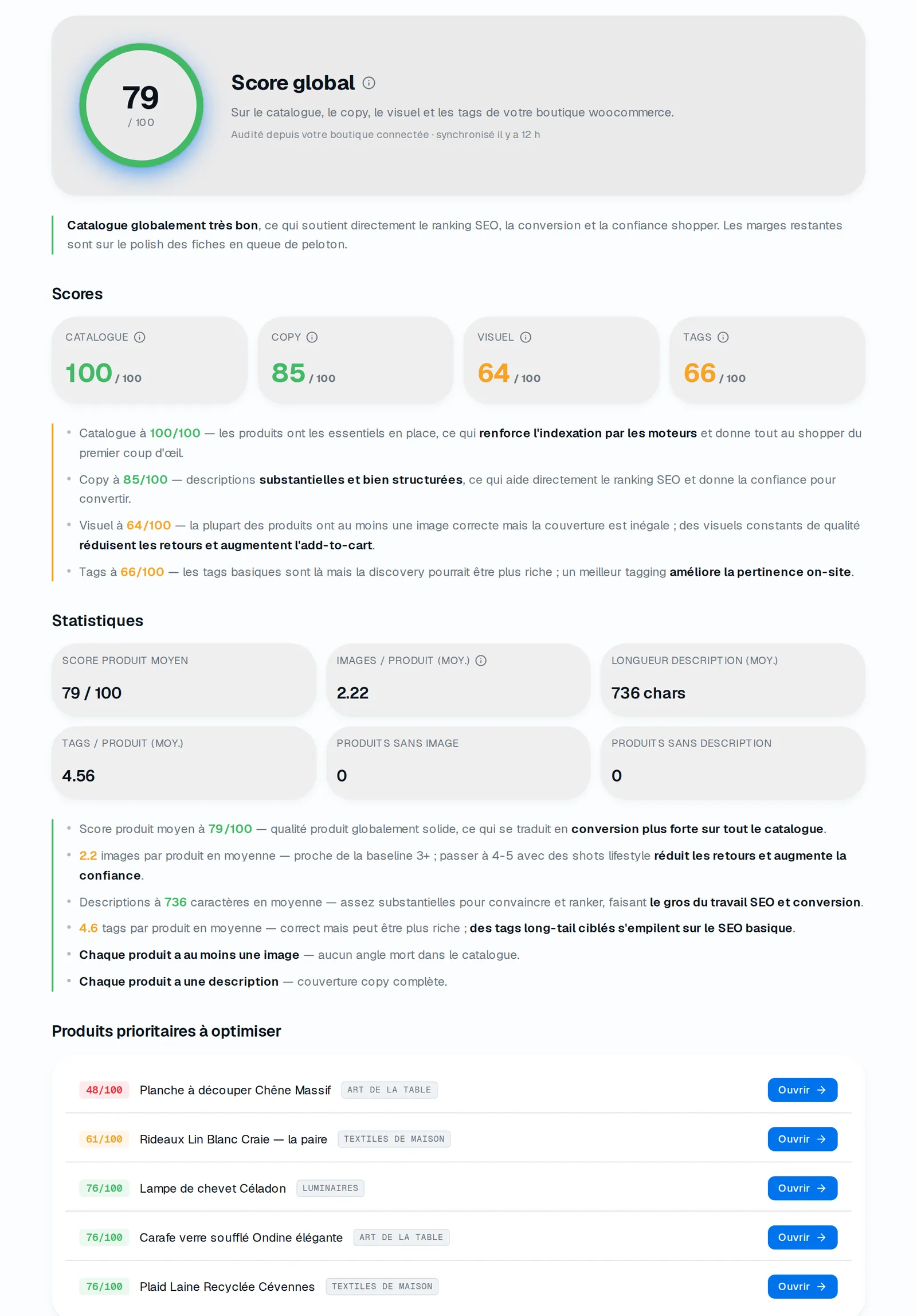
A scored catalog in OneShopLab: overall score, per-axis average and the list of the lowest-scoring products, to fix first.
Where to start: worst products first
The temptation is to start with best-sellers. It's rarely the right call. Best-sellers sell despite an average page — the upside there is small. The lowest-scoring products lose almost every visit they get: that's where each fix recovers the most sales in absolute terms.
The practical rule: sort by ascending score, treat the bottom tail first, and only touch already-good products once the rest of the catalog has climbed.
Audit by hand or automate
Doing this audit by hand is doable — for ten products. Beyond that it's untenable: opening every page, judging four axes, scoring, consolidating into a spreadsheet, across 150 or 500 products, is days of work before you've rewritten a single line. Most catalogs are never audited for that one reason.
That's exactly what our tool does: you give the store's public URL, the platform (Shopify, WooCommerce, Wix) is auto-detected, and every product is scored on the four axes above in about a minute. No install, no code. Audit a store for free and you get the quantified map described in this article — free, no card, and the starting point of any serious optimization.
What you do next
The audit isn't an end: it's the diagnosis that makes rewriting profitable, because it becomes targeted. Once the weak axes and priority products are identified, the next step is to fix them — ideally at scale, without spending weeks by hand.
That's exactly the subject of our guide Why product pages aren't converting (and how to fix an entire catalog), which picks up where this audit stops: turning a low score into a catalog that sells, without rewriting it all by hand.